PlanYourInnovation

Planning

Eisenhower matrix template: examples for work and a daily routine

When everything feels urgent, the Eisenhower matrix asks two questions about each task: is it urgent, and is it important? The answers put every task in one of four boxes: do it now, schedule it, delegate it or delete it. Here's how to use one at work, with examples for each box.

Works on your device, or I'll fix it or refund you in full.

Eisenhower Priority Planner: printable Eisenhower matrix template for work

What is the Eisenhower matrix?

The Eisenhower matrix is a two-by-two grid for deciding what to work on. It's named after President Dwight Eisenhower, who said the urgent is rarely important and the important is rarely urgent.

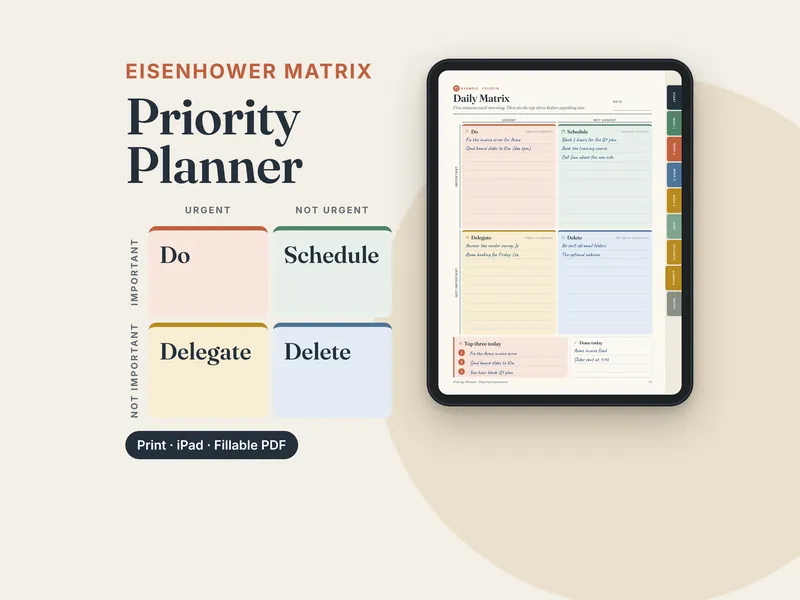
  • Do: urgent and important. Deadlines, crises and things only you can do.
  • Schedule: important, not urgent. Planning, learning and the work that moves your goals. Put it in the calendar.
  • Delegate: urgent, not important. Many emails, routine reports and meetings where you're optional.
  • Delete: not urgent, not important. Busywork and habits that eat time.

Eisenhower matrix examples for work

The same task can land in a different box for different people, so ask: would anything bad happen if this waited a week, and does it move one of my goals?

Do

  • A client escalation that's due today.
  • Your team's budget, due to finance on Friday.
  • A production bug that's blocking sales.

Schedule

  • Your Q1 plan.
  • Prep for a direct report's performance review.
  • Learning the new reporting tool before the rollout.

Delegate

  • Formatting the weekly report.
  • Booking the offsite venue.
  • A recurring meeting where someone else can take the notes and share the actions.

Delete

  • Tidying old folders nobody uses.
  • A report nobody has opened in three months.
  • Checking email every ten minutes.

How to use an Eisenhower matrix every day

  1. Empty your head. List every task on one page.
  2. Tick urgent and important next to each one. The two ticks tell you which box it goes in.
  3. Pick today's top three from Do, then Schedule.
  4. Hand off the Delegate box with an owner, a due date and a check-in date.
  5. Cross out the Delete box and don't feel bad about it.

What problems does the Eisenhower Priority Planner solve?

  • Everything feels urgent. Two ticks per task sort the list in a few minutes, and every box has a one-line rule so you never wonder where a task belongs.
  • The important work never gets done. The Weekly Matrix gives the Schedule box a place, along with your one big thing and what you'll say no to.
  • Delegated tasks fall through the cracks. The Delegation Tracker keeps who has it, when it's due and when to check in.
  • A matrix doesn't tell you what to do first. The Daily Matrix ends with your top three for today.

Eisenhower matrix in a spreadsheet

Prefer to sort tasks on a computer? The Project Planner Spreadsheet has an Eisenhower priority matrix tab that sorts your task list automatically, next to the Gantt chart and Kanban board.

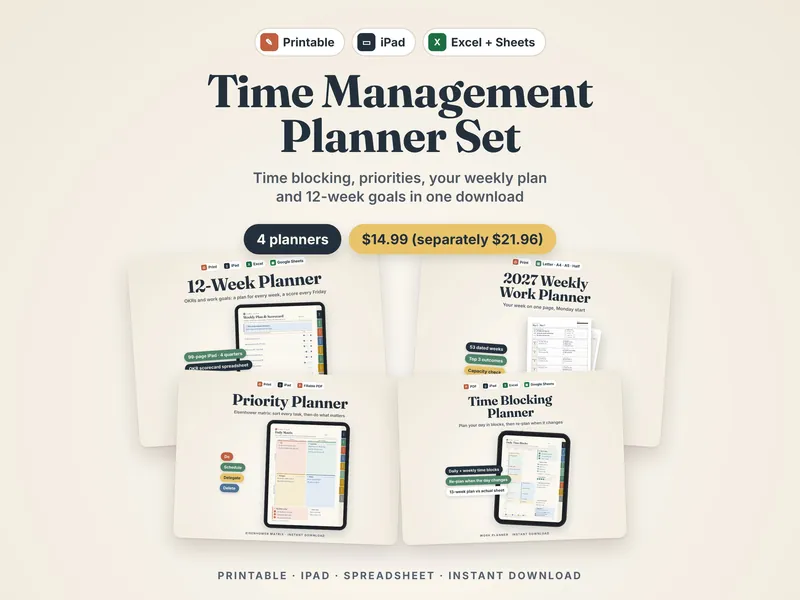
The Eisenhower Priority Planner is also part of the Time Management Planner Set, together with a time blocking planner, a 12-week goal planner and a 2027 weekly planner. Sort with the matrix, then block time for the Schedule box.

Questions

Frequently asked

What is an Eisenhower matrix template?

A page with four boxes (do, schedule, delegate, delete) where you sort your tasks by urgent and important. This one adds a brain dump page, weekly and daily matrices and a delegation tracker.

How often should I use it?

Once a week for the big picture, and for five minutes each morning to pick your top three.

Can I use it on an iPad?

Yes. The iPad version is a 36-page hyperlinked planner with four weeks of brain dump, weekly and daily pages for GoodNotes, Notability and other PDF apps.

Is it printable?

Yes. Letter, A4 and A5, in color and low ink, and the Letter and A4 color pages are fillable.